
Netron
Explore AI model architectures, layers and weights in an interactive graph. Includes a small ONNX example and supports opening your own model files.
Netron model viewer on Wasmer
Explore an AI model as an interactive graph with Netron. This template opens a small ONNX classifier immediately and keeps Netron's upstream interface unchanged.
Demo
Deploy your own copy, open its URL, and select a layer to inspect its inputs, outputs and weights. Use Netron's Open action to inspect a model from your computer; the browser handles local model files.
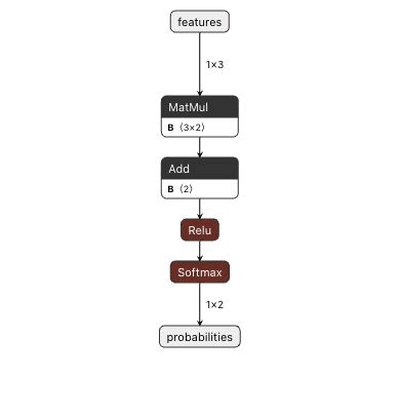
The included graph has four operations: MatMul → Add → Relu → Softmax. Its illustrative weights are original to this template. It demonstrates model inspection, not training or inference.
How it works
requirements.txtpins Netron 9.3.5, a Python wheel with no runtime dependencies.main.pystarts Netron on0.0.0.0and readsPORT, defaulting to8080.samples/tiny-classifier.onnxopens by default. It can be regenerated withpython samples/create_sample.py, using only Python's standard library.Anybuildselects the Python runtime andpython main.pystart command. The repository-rootAnybuild.python-netronprovides the same configuration when Anybuild 0.26.4 builds this monorepo with--subdir python-netron.
No database, GPU, API key or persistent volume is required. Browser-opened files are not saved to the server, so this is not a shared model-storage service.
Running locally
Use Python 3.13 and create a virtual environment:
cd python-netron
python3 -m venv .venv
.venv/bin/python -m pip install -r requirements.txt
PORT=8080 .venv/bin/python main.py
Open http://localhost:8080/. A different PORT can be supplied for local development.
Deploying to Wasmer
- Import
https://github.com/wasmerio/examplesin Wasmer and set the root directory topython-netron, or upload the contents of this directory as a folder. - Keep the Python preset and start command
python main.py. This example does not need database or secret configuration. - Deploy and open the resulting app URL. The four-layer sample should appear automatically.
For a CLI build with Anybuild 0.26.4:
cd python-netron
anybuild plan . --wasmer
anybuild . --wasmer --start
The second command builds and runs locally with Wasmer; it does not publish the app. Keep the Anybuild file with the source so the runtime and start command remain explicit.
From the repository root, inspect the monorepo configuration with anybuild plan . --subdir python-netron --wasmer. Folder uploads only need the self-contained python-netron directory.
License and upstream
Netron is created by Lutz Roeder and is distributed under the MIT license. The template and generated sample use the same license; see LICENSE. No Netron source or visual styles are changed. Other models opened by a user retain their own licenses.
