


Deploy 1,000+ apps and templates in one click
Ready-made recipes for Wasmer.
/
Ready-made recipes for Wasmer.

Grab any frame from a video URL as a JPEG, with thumbnails and an API, using FastAPI and FFmpeg.
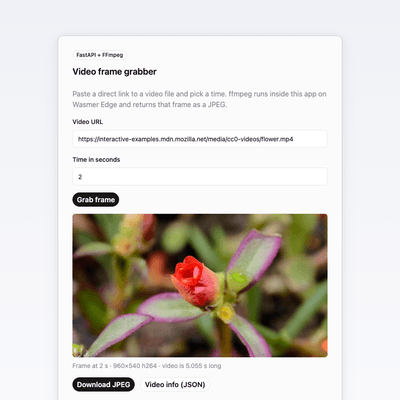
Paste a link to a video file, pick a time, and get that frame back as a JPEG. The page also shows four evenly spaced thumbnails, so you can jump through the video. Everything runs in one FastAPI app with ffmpeg-python; ffmpeg itself runs inside the app on Wasmer Edge.
https://ffmpeg-frame-grabber-template.wasmer.app/
The form starts with a short CC0 clip from MDN, so Grab frame works straight away.
Everything is in main.py:
fetch.py downloads the URL into a temporary directory (see below). Web pages (text/html), files over the size limit and slow downloads are rejected with a clear message.ffmpeg.probe() (ffprobe) reads the duration, size and codec. Files without a video track, and videos over the length limit, are rejected.ffmpeg.input(path, ss=time).output("pipe:", vframes=1, format="image2", vcodec="mjpeg") seeks to the time and writes one JPEG to stdout. ffmpeg-python builds the command and subprocess.run runs it with a timeout. Thumbnails use the same call with a scale filter.fetch.py downloads URLs safely. It resolves the host, refuses any address that isn't public (private, loopback, link-local such as 169.254.169.254, multicast, reserved, and their IPv6 forms), connects to the address it checked so DNS rebinding can't switch it, and follows at most 3 redirects, checking each one the same way. HTTPS certificates are still verified against the original hostname. Upstream errors are reported as "Could not fetch the URL." without details.
The limits are one block of constants at the top of main.py:
| Constant | Default |
|---|---|
MAX_DOWNLOAD_BYTES | 50 MB |
DOWNLOAD_TIMEOUT_SECONDS | 20 s |
MAX_DURATION_SECONDS | 30 minutes |
FFMPEG_TIMEOUT_SECONDS | 30 s per ffmpeg/ffprobe run |
THUMBNAIL_COUNT, THUMBNAIL_WIDTH | 4, 320 px |
Errors come back as JSON {"detail": "..."} from the API, or as a message on the page: 422 for invalid input, a private address or a time past the end, 400 when the URL can't be downloaded, 413 when the video is too large or too long, 415 when the file isn't a readable video, and 504 on timeouts.
The page uses the shared Wasmer starter components in static/wasmer-starter-ui.js, generated from _shared/starter-ui/ at the repository root.
| Route | Returns |
|---|---|
GET /api/frame?url=…&time=2 | The frame as image/jpeg. Add download=true to get it as an attachment. |
GET /api/info?url=… | {"duration_seconds", "width", "height", "codec", "size_bytes"} |
GET /process?url=…&time=2 | The HTML page with the result. This is the original route of this example. |
GET /docs | Interactive API docs |
curl -o frame.jpg "https://ffmpeg-frame-grabber-template.wasmer.app/api/frame?url=https://interactive-examples.mdn.mozilla.net/media/cc0-videos/flower.mp4&time=2"
The app downloads any public URL it's given. If you deploy it for others, keep the limits low or put it behind authentication.
Use Python 3.13 and install the ffmpeg command-line tools (brew install ffmpeg or apt install ffmpeg):
cd python-ffmpeg
python3 -m venv .venv
.venv/bin/pip install -r requirements-dev.txt
.venv/bin/uvicorn main:app --reload
Open http://localhost:8000/. Run the tests with .venv/bin/python -m pytest. They generate a short test video with ffmpeg and replace the download with a fake response, so they don't use the network. tests/conftest.py fakes DNS and HTTP, which also covers private addresses and redirects.
https://github.com/wasmerio/examples in Wasmer and set the root directory to python-ffmpeg, or upload this directory.uvicorn main:app. It sees ffmpeg-python in requirements.txt and adds the ffmpeg package (with ffprobe) to the app, so nothing else needs configuring.With the CLI, from this directory:
wasmer deploy
No database, secrets or volumes are needed.